
namespace win32 { namespace gui {

     namespace bg_wnd {

          template <class CellData>
          class table
          {
          public:
               // typedef's
               typedef double factor;
               typedef CellData cell_data;
               typedef table<CellData> self;

               typedef cell_proxy<self>                cell_type;
               typedef const cell_proxy<const self>    const_cell_type;

               // the big 4
               table(const cell_data& def_cell_data)
               table(const cell_data& def_cell_data, unsigned cols, unsigned rows);
               table(const table& t);
               virtual ~table()
               const table& operator= (const table& t);

               // cell access
               const cell_data default_cell_data() const;
               detail::forward_proxy<self> operator[] (unsigned col);
               const detail::forward_proxy<const self> operator[] (unsigned col) const;

               // row and column information
               inline unsigned row_count() const;
               unsigned col_count() const;
               void row_height(unsigned row, factor height_factor);
               factor row_height(unsigned row) const;
               void col_width(unsigned col, factor width_factor);
               factor col_width(unsigned col) const;

               // row and column operations
               void dimensions(unsigned cols, unsigned rows);
               void insert_row(unsigned row);
               void insert_col(unsigned col);
               void remove_col(unsigned col);
               void remove_row(unsigned row);

               // merging
               void merge_cells(const cell_range& range);
               void unmerge_cells(const cell_range& range);
               void unmerge_cells(COORDS coords);

               void swap(self& t);
          };

     }    // namespace bg_wnd


     template <class Key = int>
     class layout_painter : public painter_base, public bg_wnd::table<Key>
     {
     public:
          // typedef's
          typedef Key key_type;
          typedef const key_type& param0;

          // exceptions
          typedef bg_wnd::general_exception<self, 0> key_already_used;
          typedef bg_wnd::general_exception<self, 1> key_invalid;
          typedef bg_wnd::general_exception<self, 2> invalid_painter_cast;


          // c'tor
          layout_painter(const key_type& empty_field) : Table(empty_field), horz_margin_(0), vert_margin_(0), bOuterMargin_(true)

          // virtual functions of painter_base
          layout_painter* clone() const;
          void draw(HDC hDC, int cx, int cy);

          // own functions
          void add_painter(const key_type& key, const painter_base& painter);
          template <class Painter> void add_painter(const key_type& key);
          template <class Painter> void add_painter(const key_type& key, typename Painter::param0 param);
          template <class Painter> void add_painter(const key_type& key, typename Painter::param0 param0, typename Painter::param1 param1);
          void delete_painter(const key_type& key);
          void delete_all_painters();
          std::vector<key_type> get_keys() const;
          template <class Painter> Painter& get_painter(const key_type& key) const;
          void margin(unsigned horz_margin, unsigned vert_margin, bool bOuterMargin = true);
          POINT margin() const;
     };

} }  // namespace win32::gui
add_painter(), get_painter and delete_painter()). The only difference is that the exceptions thrown are of type bg_wnd::general_exception<layout_painter<Key>, n> (see here for further information about the exception system). dimensions(), insert_row() and insert_col(). When you insert a row or column it is inserted before the passed row/column. To insert at the end pass a huge value to the function or use dimensions(). layout[0][0]. The first index is the column, the second the row of the cell. Of course you are not allowed to use indices which are out of bound...(see Table dimensions). operator[ ][ ] is a bg_wnd::cell_proxy<CellData>-object which is typedefed to cell_type or const_cell_type in bg_wnd::table. The cell_proxy class gives you additional possibilities to retrieve information about the cell but the most important is surely to get and set the current data of a cell. To get the painter that is in a cell try this code: // assume layout is a layout_painter<std::string>... std::string key = layout[0][0]; try { ipicture_painter& p = layout.get_painter<ipicture_painter> (key); ... // do something with the painter } catch (l_painter::invalid_painter_cast&) { // painter is no ipicture_painter - get the painter_base painter_base& p = layout.get_painter (key); ... } catch (l_painter::key_invalid&) { // key is invalid (includes also default key passed to the c'tor) ... }
Example:
// typedef used in the following examples
typedef layout_painter<std::string> l_painter;

// create a layout_painter with the dimensions 3 x 3
l_painter layout("empty");
layout.dimensions(3, 3);

// create painters and set the cells
layout.add_painter<ipicture_painter> ("pic_beavis", "c:\\img1.jpg");
layout.add_painter<tile_resource_painter> ("res", bg_wnd::res_info(IDI_BACKGROUND_WND, IMAGE_ICON));

layout[0][0] = "res";
layout[0][2] = "pic_beavis";
layout[2][2] = "res";

// add layout to the background_wnd and set a blue background_color
add_painter(layout);
bk_color(RGB(0, 0, 150));
The result is as follows
col_height(). log_left(), log_top(), log_width() and log_height(). Merged cells are taken into account - if two horizontally adjacent cells are merged then log_width() would return 2.0 (assuming the column widths are 1.0). Example:
// create a layout_painter with the dimensions 3 x 2
l_painter layout("empty");
layout.dimensions(3, 2);

// create painter and set the cells
layout.add_painter<ipicture_painter> ("pic_beavis", "c:\\img1.jpg");

// fill all cells
for (unsigned col = 0; col < layout.col_count(); ++col)
     for (unsigned row = 0; row < layout.row_count(); ++row)
          layout[col][row] = "pic_beavis";

// set width of first column to 1.5 as wide as the others
layout.col_width(0, 1.5);

l_painter::const_cell_type cell = layout[0][0];
l_painter::factor f1 = cell.log_width();            // f1 = 1.5
l_painter::factor f2 = cell.log_height();           // f2 = 1.0
l_painter::factor f3 = cell.log_left();             // f3 = 0.0
l_painter::factor f4 = layout[1][0].log_left();     // f4 = 1.5

// add layout to the background_wnd
add_painter(layout);
The result is as follows
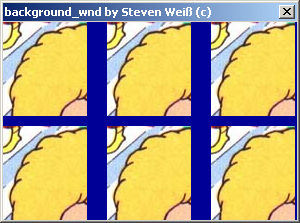
margin(). The values passed are not logical - they are real pixels! There are two possibilities: with or without an additional border around the cells (that's the bOuterMargin argument). // create a layout_painter with the dimensions 3 x 2 l_painter layout("empty"); layout.dimensions(3, 2); // create painter and set the cells layout.add_painter<ipicture_painter> ("pic_beavis", "c:\\img1.jpg"); for (unsigned col = 0; col < layout.col_count(); ++col) for (unsigned row = 0; row < layout.row_count(); ++row) layout[col][row] = "pic_beavis"; // set the margin bool bOuterMargin = ...; layout.margin(20, 10, bOuterMargin); // add layout to the background_wnd and set a blue background_color add_painter(layout); bk_color(RGB(0, 0, 150));
The result is as follows
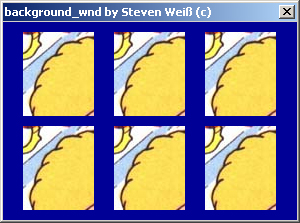
| 
|
| bOuterMargin = true | bOuterMargin = false |
merge_cells(). It takes a bg_wnd::cell_range-object as a parameter which identifies the range of the cells to merge. If this range intersects an existing range of merged cells, they are combined to one large range. unmerge_cells(). When unmerging cells the painters which were assigned to these cells before merging are restored. range()-function. When a cell is in a merged range the whole range is returned. // create a layout_painter with the dimensions 3 x 2 l_painter layout("empty"); layout.dimensions(3, 2); // create painters and set the cells layout.add_painter<ipicture_painter> ("pic_beavis", "c:\\img1.jpg"); // fill all cells for (unsigned col = 0; col < layout.col_count(); ++col) for (unsigned row = 0; row < layout.row_count(); ++row) layout[col][row] = "pic_beavis"; // merge the cells layout.merge_cells( bg_wnd::cell_range(bg_wnd::COORDS(0, 0), 1, 2) ); bg_wnd::cell_range range = layout[0][0].range(); // range = (0, 0) - (0, 1) // add layout to the background_wnd add_painter(layout);
The result is as follows
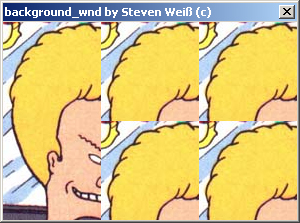

|
by Steven Weiss. You can contact me at steven11@gmx.de. |